As part of our QuickAdminPanel we also generate APIs. But your goal is also to provide documentation to the front end that would consume this API, right? OpenAPI (e.g. Swagger) is a well-known standard for this. How to apply it to a Laravel project?
In this article we will have these sections:
- Brief introduction: What is OpenAPI and how does it work?
- Preparation: Initial Laravel API code
- Installing the Laravel Swagger package
- Writing comments and generating documentation
At the end of the article you will find a link to an example Github repository.
Brief introduction: What is OpenAPI and how does it work?
First, a few words about what OpenAPI/Swagger is.
Formerly called Swagger (we call it that quite often even now), OpenAPI is an API documentation standard. Its specification is available on Github here.
The official definition from their homepage: “The OpenAPI specification: a widely adopted industry standard for describing modern APIs. »
Keep in mind that this is not a Laravel API standard. Not even the PHP language standard. It is an API schema that can be used for any programming language. It’s like a set of rules that can be adapted to your setting.
For Laravel specifically, a few packages have been created, and we will use one of them: DarkaOnLine/L5-Swagger.
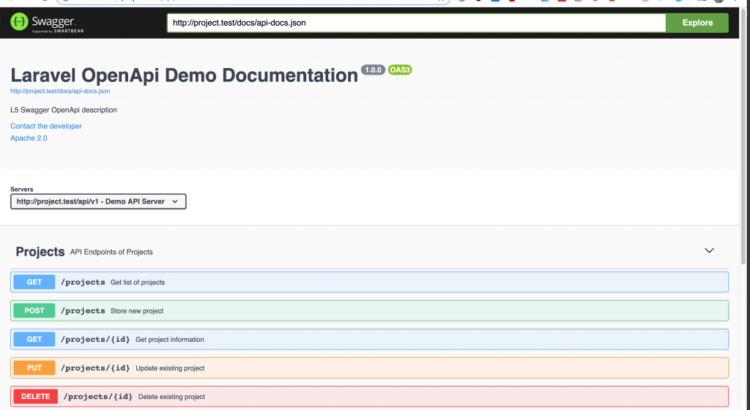
Let’s take a look at the end result – here is the documentation page that will be automatically generated from your code comments:
On this page, you can click on items to expand them and get more information.
And all because you wrote a few comments, like these:
class ProjectsApiController extends Controller
{
    /**
     * @OA\Get(
     *      path="/projects",
     *      operationId="getProjectsList",
     *      tags={"Projects"},
     *      summary="Get list of projects",
     *      description="Returns list of projects",
     *      @OA\Response(
     *          response=200,
     *          description="Successful operation",
     *          @OA\JsonContent(ref="#/components/schemas/ProjectResource")
     *       ),
     *      @OA\Response(
     *          response=401,
     *          description="Unauthenticated",
     *      ),
     *      @OA\Response(
     *          response=403,
     *          description="Forbidden"
     *      )
     *     )
     */
    public function index()
    {
        abort_if(Gate::denies('project_access'), Response::HTTP_FORBIDDEN, '403 Forbidden');

        return new ProjectResource(Project::with(['author'])->get());
    }
So this is a brief overview, now let’s dig deeper and show how to generate the documentation step by step.
Preparation: Initial Laravel API code
First, I’ll show the basic code of the API structure, it can be useful to learn even if you don’t plan to generate documentation.
Imagine you have a model Project and all associated API actions: index, store, update, display, destroy.
So here it is routes/api.php:
Route::group([
  'prefix' => 'v1',
  'as' => 'api.',
  'namespace' => 'Api\V1\Admin',
  'middleware' => ['auth:api']
], function () {
    Route::apiResource('projects', 'ProjectsApiController');
});
In this example, we put the ProjectsApiController inside of V1/Administrator subfolder.
So here is the code for our app/Http/Controllers/V1/Admin/ProjectsApiController.php:
namespace App\Http\Controllers\Api\V1\Admin;

use App\Http\Controllers\Controller;
use App\Http\Requests\StoreProjectRequest;
use App\Http\Requests\UpdateProjectRequest;
use App\Http\Resources\Admin\ProjectResource;
use App\Project;
use Gate;
use Illuminate\Http\Request;
use Symfony\Component\HttpFoundation\Response;

class ProjectsApiController extends Controller
{
    public function index()
    {
        abort_if(Gate::denies('project_access'), Response::HTTP_FORBIDDEN, '403 Forbidden');

        return new ProjectResource(Project::with(['author'])->get());
    }

    public function store(StoreProjectRequest $request)
    {
        $project = Project::create($request->all());

        return (new ProjectResource($project))
            ->response()
            ->setStatusCode(Response::HTTP_CREATED);
    }

    public function show(Project $project)
    {
        abort_if(Gate::denies('project_show'), Response::HTTP_FORBIDDEN, '403 Forbidden');

        return new ProjectResource($project->load(['author']));
    }

    public function update(UpdateProjectRequest $request, Project $project)
    {
        $project->update($request->all());

        return (new ProjectResource($project))
            ->response()
            ->setStatusCode(Response::HTTP_ACCEPTED);
    }

    public function destroy(Project $project)
    {
        abort_if(Gate::denies('project_delete'), Response::HTTP_FORBIDDEN, '403 Forbidden');

        $project->delete();

        return response(null, Response::HTTP_NO_CONTENT);
    }
}
Here are a few more things we should mention:
Here is one such file – app/Http/Resources/Admin/ProjectResource.php:
namespace App\Http\Resources\Admin;

use Illuminate\Http\Resources\Json\JsonResource;

class ProjectResource extends JsonResource
{
    public function toArray($request)
    {
        return parent::toArray($request);
    }
}
Also, for validation – app/Http/Requests/StoreProjectRequest.php:
namespace App\Http\Requests;

use Gate;
use Illuminate\Foundation\Http\FormRequest;
use Symfony\Component\HttpFoundation\Response;

class StoreProjectRequest extends FormRequest
{
    public function authorize()
    {
        abort_if(Gate::denies('project_create'), Response::HTTP_FORBIDDEN, '403 Forbidden');
        return true;
    }

    public function rules()
    {
        return [
            'name' => [
                'required',
            ],
        ];
    }
}
So, here’s our start. Now let’s start generating the documentation with OpenAPI.
Installing the Laravel Swagger package
One of the most popular packages for generating OpenAPI documentation in Laravel is DarkaOnLine/L5-Swagger.
Don’t let the name fool you: it hasn’t changed the part of the name from Swagger to OpenAPI, but it supports both standards. Also, “L5” in the name doesn’t matter either – current Laravel 6 is well supported.
We therefore install the package:
composer require darkaonline/l5-swagger
Then, following the installation instructions in Readme, we publish the service provider configurations/views:
php artisan vendor:publish --provider "L5Swagger\L5SwaggerServiceProvider"
Finally, we have config/l5-swagger.php file with a huge amount of options:
 [
        /*
        |--------------------------------------------------------------------------
        | Edit to set the api's title
        |--------------------------------------------------------------------------
        */

        'title' => 'L5 Swagger UI',
    ],

    'routes' => [
        /*
        |--------------------------------------------------------------------------
        | Route for accessing api documentation interface
        |--------------------------------------------------------------------------
        */

        'api' => 'api/documentation',

        // ...

    ],

    // ... many more options

    /*
    |--------------------------------------------------------------------------
    | Uncomment to add constants which can be used in annotations
    |--------------------------------------------------------------------------
     */
    'constants' => [
        'L5_SWAGGER_CONST_HOST' => env('L5_SWAGGER_CONST_HOST', '
    ],
];
For this example, we will modify the title from “L5 Swagger UI” to “Projects API”, and add it in .env deposit:
L5_SWAGGER_CONST_HOST=
And then we should run this magic command:
php artisan l5-swagger:generate
It must generate a JSON file, which will then be transformed into an HTML page.
But for now, it won’t generate anything, because we have not added any comments anywhere. Shall we?
Writing comments and generating documentation
This is probably the main part of this article: the rules on how to write these comments and where exactly.
The package will scan all your files and look for comment patterns related to OpenAPI.
So what types of comments should we add?
- Overall: comments on the project
- Local: controller/method comments
- Virtual: models, validation and response comments
I’ll just list the comments here, for more information on their logic please refer to the short examples inside the Laravel package, or the detailed official OpenAPI specification.
Comment type 1: Global
We need to provide the information about the whole project, and for that we create a separate file – an empty controller that would not even be used anywhere – app/Http/Controllers/Api/Controller.php:
class Controller
{
    /**
     * @OA\Info(
     *      version="1.0.0",
     *      title="Laravel OpenApi Demo Documentation",
     *      description="L5 Swagger OpenApi description",
     *      @OA\Contact(
     *          email="admin@admin.com"
     *      ),
     *      @OA\License(
     *          name="Apache 2.0",
     *          url="
     *      )
     * )
     *
     * @OA\Server(
     *      url=L5_SWAGGER_CONST_HOST,
     *      description="Demo API Server"
     * )

     *
     * @OA\Tag(
     *     name="Projects",
     *     description="API Endpoints of Projects"
     * )
     */
}
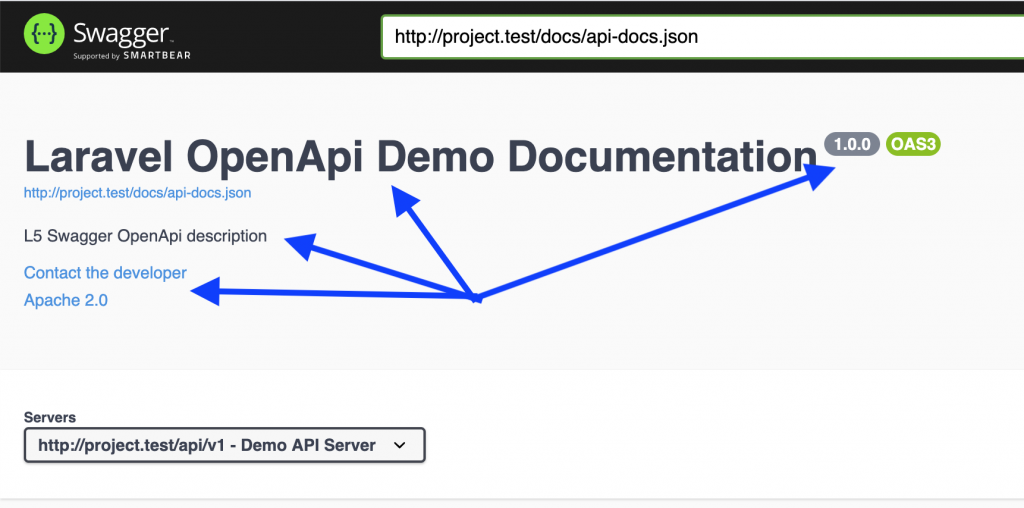
These variables will help generate the main information in the documentation page header:
Comment type 2: controller methods
To describe each API endpoint, we need to add comment annotations above each method in the API controllers.
Here is a complete example of our app/Http/Controllers/Api/V1/Admin/ProjectsApiController.php:
class ProjectsApiController extends Controller
{
    /**
     * @OA\Get(
     *      path="/projects",
     *      operationId="getProjectsList",
     *      tags={"Projects"},
     *      summary="Get list of projects",
     *      description="Returns list of projects",
     *      @OA\Response(
     *          response=200,
     *          description="Successful operation",
     *          @OA\JsonContent(ref="#/components/schemas/ProjectResource")
     *       ),
     *      @OA\Response(
     *          response=401,
     *          description="Unauthenticated",
     *      ),
     *      @OA\Response(
     *          response=403,
     *          description="Forbidden"
     *      )
     *     )
     */
    public function index()
    {
        abort_if(Gate::denies('project_access'), Response::HTTP_FORBIDDEN, '403 Forbidden');

        return new ProjectResource(Project::with(['author'])->get());
    }

    /**
     * @OA\Post(
     *      path="/projects",
     *      operationId="storeProject",
     *      tags={"Projects"},
     *      summary="Store new project",
     *      description="Returns project data",
     *      @OA\RequestBody(
     *          required=true,
     *          @OA\JsonContent(ref="#/components/schemas/StoreProjectRequest")
     *      ),
     *      @OA\Response(
     *          response=201,
     *          description="Successful operation",
     *          @OA\JsonContent(ref="#/components/schemas/Project")
     *       ),
     *      @OA\Response(
     *          response=400,
     *          description="Bad Request"
     *      ),
     *      @OA\Response(
     *          response=401,
     *          description="Unauthenticated",
     *      ),
     *      @OA\Response(
     *          response=403,
     *          description="Forbidden"
     *      )
     * )
     */
    public function store(StoreProjectRequest $request)
    {
        $project = Project::create($request->all());

        return (new ProjectResource($project))
            ->response()
            ->setStatusCode(Response::HTTP_CREATED);
    }

    /**
     * @OA\Get(
     *      path="/projects/{id}",
     *      operationId="getProjectById",
     *      tags={"Projects"},
     *      summary="Get project information",
     *      description="Returns project data",
     *      @OA\Parameter(
     *          name="id",
     *          description="Project id",
     *          required=true,
     *          in="path",
     *          @OA\Schema(
     *              type="integer"
     *          )
     *      ),
     *      @OA\Response(
     *          response=200,
     *          description="Successful operation",
     *          @OA\JsonContent(ref="#/components/schemas/Project")
     *       ),
     *      @OA\Response(
     *          response=400,
     *          description="Bad Request"
     *      ),
     *      @OA\Response(
     *          response=401,
     *          description="Unauthenticated",
     *      ),
     *      @OA\Response(
     *          response=403,
     *          description="Forbidden"
     *      )
     * )
     */
    public function show(Project $project)
    {
        abort_if(Gate::denies('project_show'), Response::HTTP_FORBIDDEN, '403 Forbidden');

        return new ProjectResource($project->load(['author']));
    }

    /**
     * @OA\Put(
     *      path="/projects/{id}",
     *      operationId="updateProject",
     *      tags={"Projects"},
     *      summary="Update existing project",
     *      description="Returns updated project data",
     *      @OA\Parameter(
     *          name="id",
     *          description="Project id",
     *          required=true,
     *          in="path",
     *          @OA\Schema(
     *              type="integer"
     *          )
     *      ),
     *      @OA\RequestBody(
     *          required=true,
     *          @OA\JsonContent(ref="#/components/schemas/UpdateProjectRequest")
     *      ),
     *      @OA\Response(
     *          response=202,
     *          description="Successful operation",
     *          @OA\JsonContent(ref="#/components/schemas/Project")
     *       ),
     *      @OA\Response(
     *          response=400,
     *          description="Bad Request"
     *      ),
     *      @OA\Response(
     *          response=401,
     *          description="Unauthenticated",
     *      ),
     *      @OA\Response(
     *          response=403,
     *          description="Forbidden"
     *      ),
     *      @OA\Response(
     *          response=404,
     *          description="Resource Not Found"
     *      )
     * )
     */
    public function update(UpdateProjectRequest $request, Project $project)
    {
        $project->update($request->all());

        return (new ProjectResource($project))
            ->response()
            ->setStatusCode(Response::HTTP_ACCEPTED);
    }

    /**
     * @OA\Delete(
     *      path="/projects/{id}",
     *      operationId="deleteProject",
     *      tags={"Projects"},
     *      summary="Delete existing project",
     *      description="Deletes a record and returns no content",
     *      @OA\Parameter(
     *          name="id",
     *          description="Project id",
     *          required=true,
     *          in="path",
     *          @OA\Schema(
     *              type="integer"
     *          )
     *      ),
     *      @OA\Response(
     *          response=204,
     *          description="Successful operation",
     *          @OA\JsonContent()
     *       ),
     *      @OA\Response(
     *          response=401,
     *          description="Unauthenticated",
     *      ),
     *      @OA\Response(
     *          response=403,
     *          description="Forbidden"
     *      ),
     *      @OA\Response(
     *          response=404,
     *          description="Resource Not Found"
     *      )
     * )
     */
    public function destroy(Project $project)
    {
        abort_if(Gate::denies('project_delete'), Response::HTTP_FORBIDDEN, '403 Forbidden');

        $project->delete();

        return response(null, Response::HTTP_NO_CONTENT);
    }
}
Wow, that’s a LOT of comments, right?
But this is the right way to prepare documentation: you must describe all the methods, all the cases, all the parameters, all the exceptions.
Comment type 3: Model, validation and response
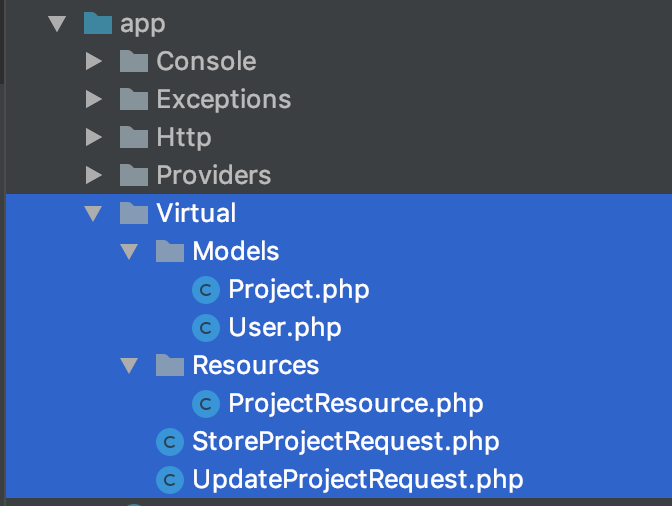
You may have noticed references to external files in the controller comments above. So what is it StoreProjectRequest there? We define all these rules in our folder called application/virtualsee the list of files:
Let’s take a look inside app/Virtual/Models/Project.php:
/**
 * @OA\Schema(
 *     title="Project",
 *     description="Project model",
 *     @OA\Xml(
 *         name="Project"
 *     )
 * )
 */
class Project
{

    /**
     * @OA\Property(
     *     title="ID",
     *     description="ID",
     *     format="int64",
     *     example=1
     * )
     *
     * @var integer
     */
    private $id;

    /**
     * @OA\Property(
     *      title="Name",
     *      description="Name of the new project",
     *      example="A nice project"
     * )
     *
     * @var string
     */
    public $name;

    /**
     * @OA\Property(
     *      title="Description",
     *      description="Description of the new project",
     *      example="This is new project's description"
     * )
     *
     * @var string
     */
    public $description;

    /**
     * @OA\Property(
     *     title="Created at",
     *     description="Created at",
     *     example="2020-01-27 17:50:45",
     *     format="datetime",
     *     type="string"
     * )
     *
     * @var \DateTime
     */
    private $created_at;

    /**
     * @OA\Property(
     *     title="Updated at",
     *     description="Updated at",
     *     example="2020-01-27 17:50:45",
     *     format="datetime",
     *     type="string"
     * )
     *
     * @var \DateTime
     */
    private $updated_at;

    /**
     * @OA\Property(
     *     title="Deleted at",
     *     description="Deleted at",
     *     example="2020-01-27 17:50:45",
     *     format="datetime",
     *     type="string"
     * )
     *
     * @var \DateTime
     */
    private $deleted_at;

    /**
     * @OA\Property(
     *      title="Author ID",
     *      description="Author's id of the new project",
     *      format="int64",
     *      example=1
     * )
     *
     * @var integer
     */
    public $author_id;


    /**
     * @OA\Property(
     *     title="Author",
     *     description="Project author's user model"
     * )
     *
     * @var \App\Virtual\Models\User
     */
    private $author;
}
You see, we need to define every property of this Project model, including the relationship with the author.
Now, what about form validation requests? See app/Virtual/StoreProjectRequest.php:
/**
 * @OA\Schema(
 *      title="Store Project request",
 *      description="Store Project request body data",
 *      type="object",
 *      required={"name"}
 * )
 */

class StoreProjectRequest
{
    /**
     * @OA\Property(
     *      title="name",
     *      description="Name of the new project",
     *      example="A nice project"
     * )
     *
     * @var string
     */
    public $name;

    /**
     * @OA\Property(
     *      title="description",
     *      description="Description of the new project",
     *      example="This is new project's description"
     * )
     *
     * @var string
     */
    public $description;

    /**
     * @OA\Property(
     *      title="author_id",
     *      description="Author's id of the new project",
     *      format="int64",
     *      example=1
     * )
     *
     * @var integer
     */
    public $author_id;
}
Almost a copy and paste, right?
Finally, we need to define the API resource, which would be “data” in our case – in app/Virtuel/Resources/ProjectResource.php:
/**
 * @OA\Schema(
 *     title="ProjectResource",
 *     description="Project resource",
 *     @OA\Xml(
 *         name="ProjectResource"
 *     )
 * )
 */
class ProjectResource
{
    /**
     * @OA\Property(
     *     title="Data",
     *     description="Data wrapper"
     * )
     *
     * @var \App\Virtual\Models\Project[]
     */
    private $data;
}
And there it is, finally it! We can run this craft command again:
php artisan l5-swagger:generate
Yes!
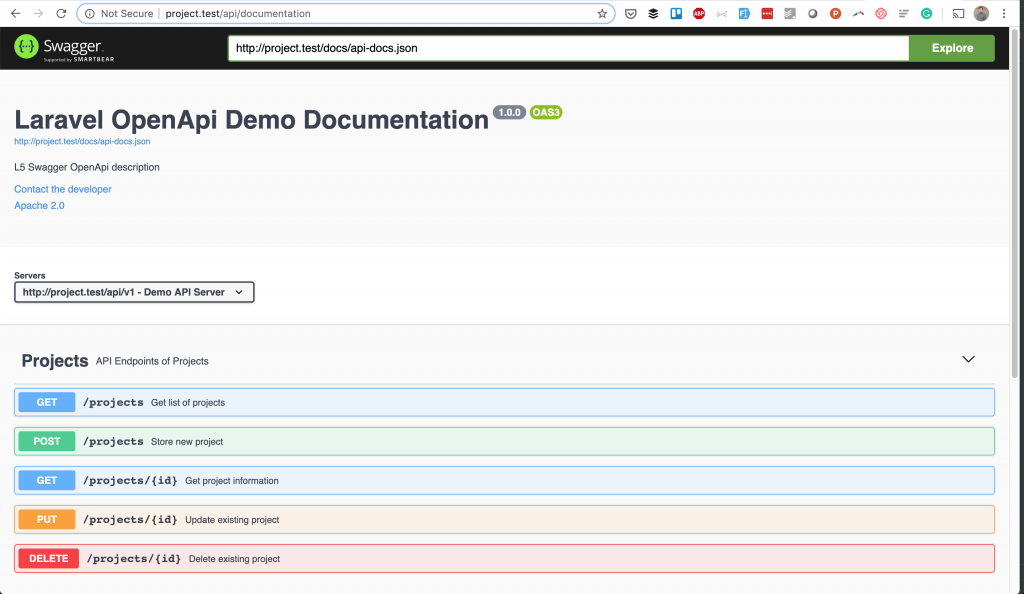
And if you click on any endpoint, it expands with all the parameters you provided, and even with an example response – that’s the beauty of it:
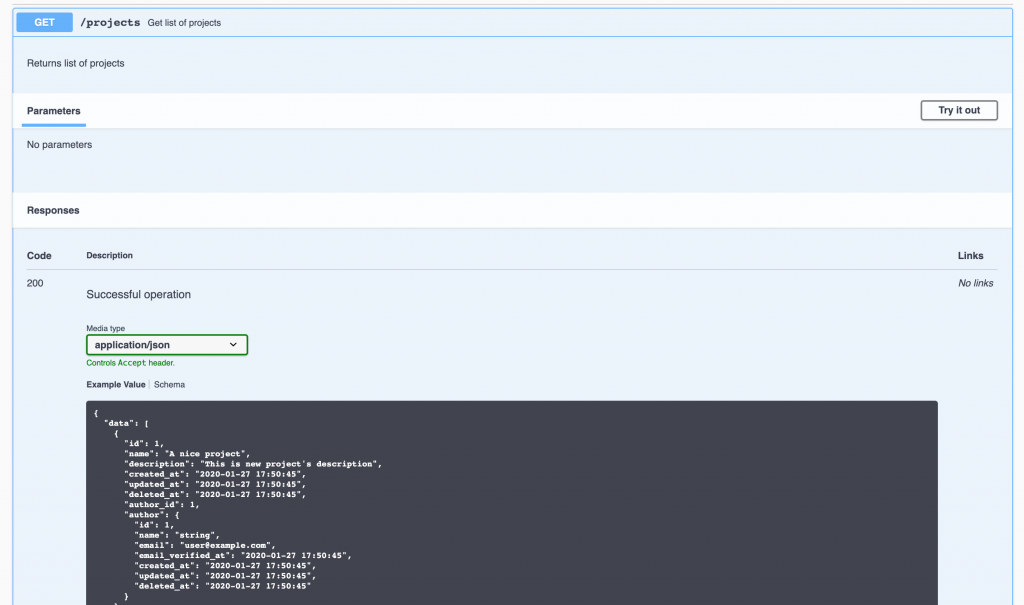
Finally, a nice little thing on this documentation page is that you can click “Try it” (see top right of screenshot above) and it would try to execute this API call. But keep in mind that you need to be authenticated exactly as your API requires.
Conclusion and “faster” alternative to OpenAPI
If you’re like me when I was first reading about OpenAPI, this is a huge amount of information to take in. And that seems like a lot of work just to generate the documentation, right?
But if you’re dealing with a larger project, you’ll inevitably have to spend a lot of time on documentation, and OpenAPI is a standard for almost everyone these days, so it’s worth investing in.
This wouldn’t be as applicable to small projects, it might even seem like overkill. So for those, I would recommend another Laravel package, which requires less comments to generate roughly similar HTML documentation: mpociot/laravel-apidoc-generator
As promised, the Github repository for this article is here: LaravelDaily/Laravel-OpenAPI-Swagger-Documentation-Example