When we say Datatables, we mainly assume that it is a table containing data. Text data – such as name, email, description and buttons to edit/delete. But in reality, it is more practical to have more complex data in a single cell. Let’s see how to build it.
Here is an example of a typical Datatable:
Next step – we will add a Photo column:
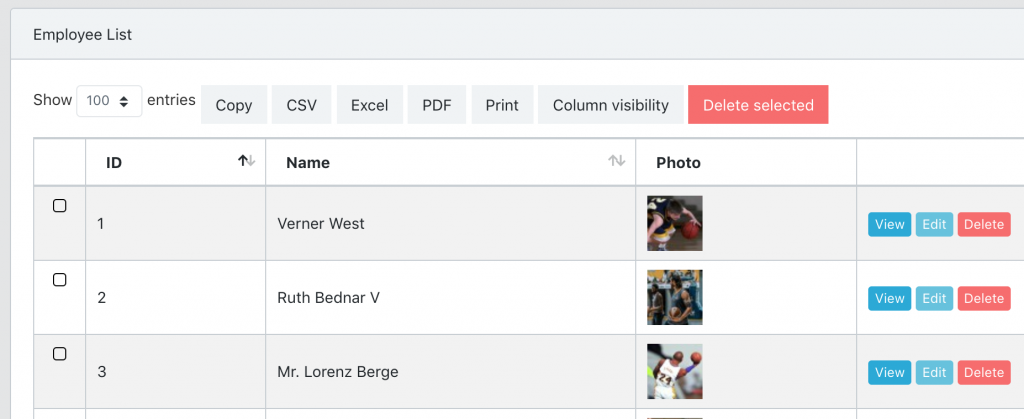
And finally, we will add a column with multi-line data and badge icons:
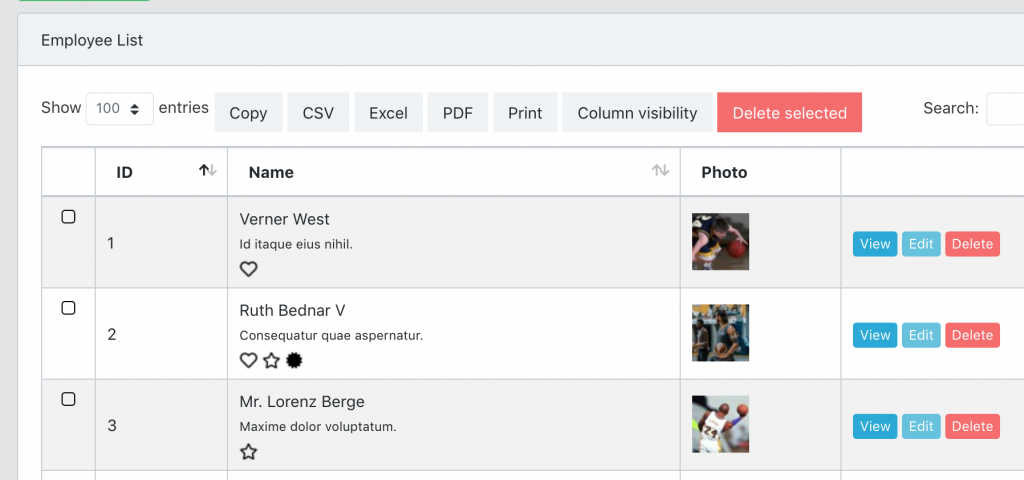
So, let’s build it step by step, and at the end of the article you will have a link to the Github repository.
Simple Data Tables Code
Inside our QuickAdminPanel builder we have the AJAX Datatables module which uses the Yajra Datatables Laravel package.
So in EmployeesController we have this:
// ... more uses
use Yajra\DataTables\Facades\DataTables;

class EmployeesController extends Controller
{
    public function index(Request $request)
    {
        $query = Employee::with(['badges'])->select(sprintf('%s.*', (new Employee)->table));
        $table = Datatables::of($query);

        // Column for View/Edit/Delete buttons
        $table->addColumn('actions', ' ');
        $table->editColumn('actions', function ($row) {
            return view('partials.datatablesActions', compact('row'));
        });
        $table->rawColumns(['actions']);

        return $table->make(true);
    }
}
And then here is resources/views/employees/index.blade.php:
<table class="table table-bordered table-striped table-hover ajaxTable datatable datatable-Employee">
    <thead>
        <tr>
            <th width="10">

            </th>
            <th>
                ID
            </th>
            <th>
                Name
            </th>
            <th>

            </th>
        </tr>
    </thead>
</table>

<script>
$(function () {
    let dtOverrideGlobals = {
        processing: true,
        serverSide: true,
        retrieve: true,
        ajax: "{{ route('admin.employees.index') }}",
            columns: [
                { data: 'id', name: 'id' },
                { data: 'name', name: 'name' },
                { data: 'actions', name: 'actions' }
            ],
            order: [[ 1, 'desc' ]],
            pageLength: 100,
    };
    $('.datatable-Employee').DataTable(dtOverrideGlobals);
});
</script>
Notice: actually the code is a bit more complicated, I skipped some parts which are not relevant for this tutorial.
Upgrade 1. Added “Photo” field
To add a photo field, in the Blade file we simply add it like a typical column:
<table class="table table-bordered table-striped table-hover ajaxTable datatable datatable-Employee">
...
            <th>
                Name
            </th>
            <th>
                Photo
            </th>
...
</table>

<script>
$(function () {
...
            columns: [
                { data: 'name', name: 'name' },
                { data: 'photo', name: 'photo', sortable: false, searchable: false }
...
});
</script>
Notice how I added two additional parameters in the column:
– sortable: false
– searchable: false
The reason is simple: we shouldn’t be able to use the Datatable search or sort functionality for the photo column, because it will be HTML.
Now in Controller we simply manipulate this column with $table->editColumn() method – and from there we can return whatever HTML we want.
In our case we have a relationship between employee and photo (see how QuickAdminPanel handles file/photo uploads), in your case the logic may be different. The code is as follows:
class EmployeesController extends Controller
{
    public function index(Request $request)
    {
        // ...

        $table = Datatables::of($query);

        // ...

        $table->editColumn('photo', function ($row) {
            if ($photo = $row->photo) {
                return sprintf(
                    '<a href=" target="_blank"><img src=" width="50px" height="50px"></a>',
                    $photo->url,
                    $photo->thumbnail
                );
            }

            return '';
        });

       return $table->make(true);
    }
}
And that’s it, we have a photo section!
Upgrade 2. Multi-line column with badges
And if we have employees position and also employed badges as a many-to-many relationship, and I want to show that all of this in the same column under Name?
So in this case we edit the column on the front-end side, in the Blade index only, with give back JavaScript method:
$(function () {
...
    columns: [
        { data: 'name', name: 'name' },
        {
            data: null,
            name: 'name',
            render: data => {
                let badges = "";
                data.badges.forEach(badge => {
                    badges += '<img class="mr-1" src="'+badge.icon.thumbnail+'" alt="'+badge.name+'">'
                });

                return data.name+'<br><small>'+data.position+'</small><br>'+badges;
            }
        },
        { data: 'photo', name: 'photo', sortable: false, searchable: false }
...
});
Yes!
Conclusion: rendered on Back-end or Front-end?
In this example, I showed two ways to customize columns in AJAX Datatable: by modifying the back-end logic in Controller or by modifying the front-end logic in JavaScript.
How do you know which one to use?
It’s pretty simple: if you need more complicated logic to calculate the data, it should be in Controller.
Otherwise, if it’s just rendering with the data you already have, it should be in JavaScript.
Full repository for this project: LaravelDaily/Laravel-Datatables-Customize-Cells