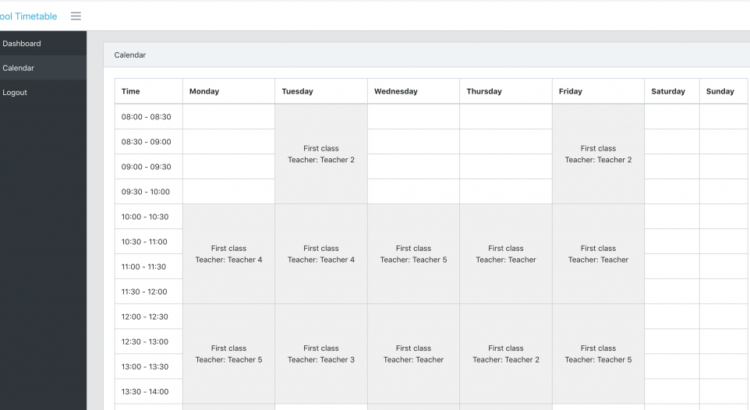
We’re seeing more and more use cases for our QuickAdminPanel, and here’s a new demo project we’ve created to manage a school timetable. This does not necessarily have to be a school, it can apply to any organization with a weekly schedule.
How does it look/work?
At the bottom of the article you will have a link to the Github repository, but in the meantime, let’s see the features.
In this system we have three user roles:
- Teachers
- Students
- Administrators
And when a student logs in, they see their own weekly schedule.
Additionally, each teacher only sees their own schedule.
This schedule is managed by administrators. They enter lessons by attaching them to a class and a teacher.
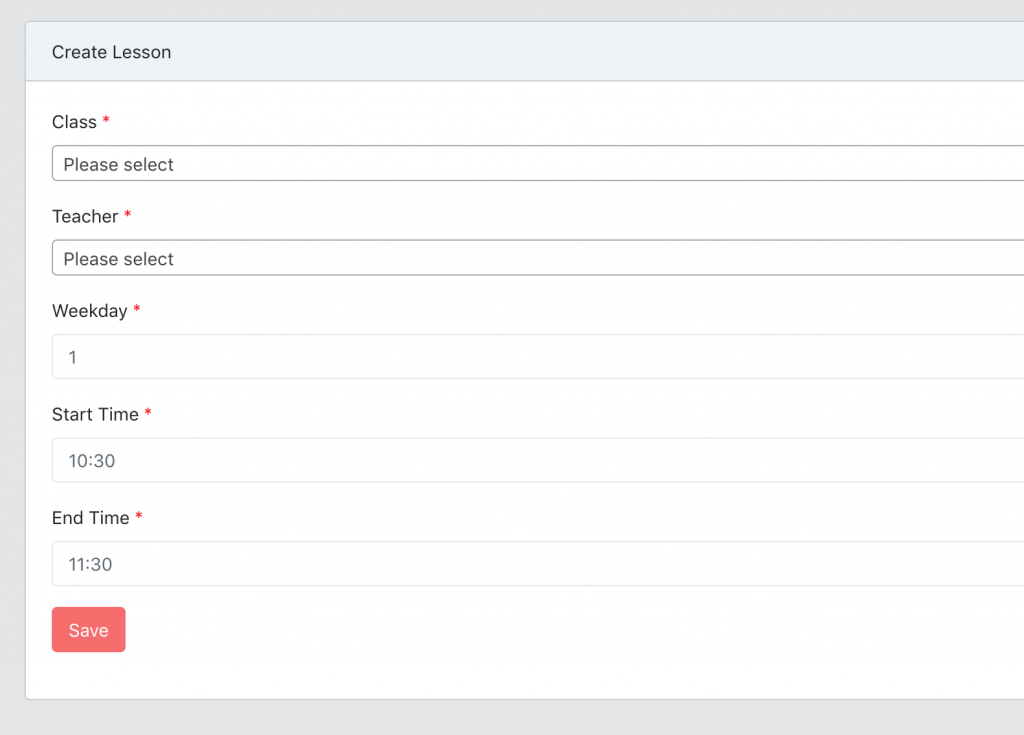
Each student belongs to a class, which means that the class schedule becomes the schedule of each student in that class.
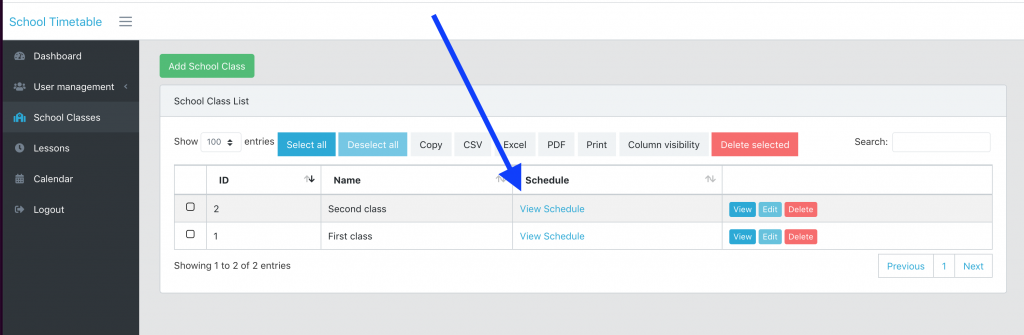
Finally, there is a function that allows the administrator to view the schedule of a certain course.
Database structure
Here is the structure of our database:
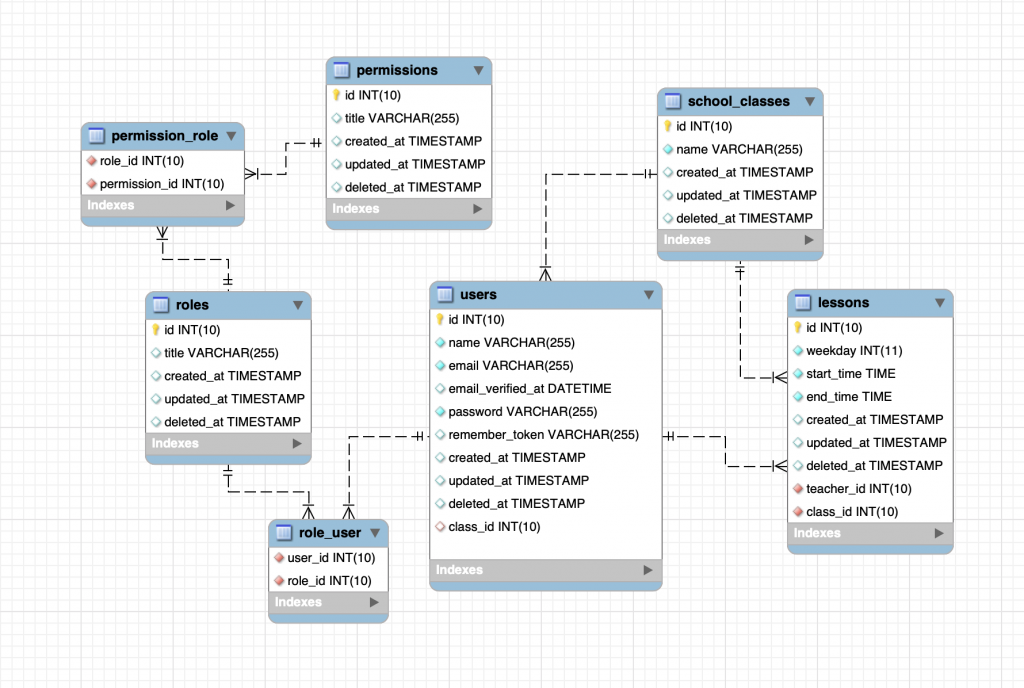
The tables on the left are from our Roles/Permissions system in QuickAdminPanel, with three roles built into the database. And on the right side we have lessons and classes, both attached to users but with different meaning: a user belongs to a class, and a lesson belongs to a teacher user.
Interesting code snippets
I won’t list all the code here, as you will have the Github repository at the end of the article, but I will mention a few things.
Eloquent query: local scopes
We show the same calendar, but filtering based on parameters – logged in user and GET request query.
Instead of doing this in Controller, we create a local scope in the app/Lesson.php model:
class Lesson extends Model
{
    // ...

    public function scopeCalendarByRoleOrClassId($query)
    {
        return $query->when(!request()->input('class_id'), function ($query) {
                $query->when(auth()->user()->is_teacher, function ($query) {
                    $query->where('teacher_id', auth()->user()->id);
                })
                ->when(auth()->user()->is_student, function ($query) {
                    $query->where('class_id', auth()->user()->class_id ?? '0');
                });
            })
            ->when(request()->input('class_id'), function ($query) {
                $query->where('class_id', request()->input('class_id'));
            });
    }
}
And then in the CalendarControllerwe have this short sentence:
$lessons = Lesson::with('class', 'teacher')
    ->calendarByRoleOrClassId()
    ->get();
Eloquent accessors
You have probably noticed checks like auth()->user()->is_teacher in the code above. These are not real database fields, they are actually attributes inside app/User.php model:
class User extends Authenticatable
{
    // ...

    public function getIsAdminAttribute()
    {
        return $this->roles()->where('id', 1)->exists();
    }

    public function getIsTeacherAttribute()
    {
        return $this->roles()->where('id', 3)->exists();
    }

    public function getIsStudentAttribute()
    {
        return $this->roles()->where('id', 4)->exists();
    }

}
Constant for days of the week
This is a questionable decision, because we could have used the Carbon/PHP functions, we decided to separate the days of the week into a constant inside app/User.php:
const WEEK_DAYS = [
    '1' => 'Monday',
    '2' => 'Tuesday',
    '3' => 'Wednesday',
    '4' => 'Thursday',
    '5' => 'Friday',
    '6' => 'Saturday',
    '7' => 'Sunday',
];
And then, whenever we need it in tabular form, we do this:
Controller:
$weekDays = Lesson::WEEK_DAYS;
return view('admin.calendar', compact('weekDays'));
Blade:
@foreach($weekDays as $index => $day)
  ...
@endforeach
No calendar plugin
Finally, you will notice that we do not use any libraries to visualize the calendar, like FullCalendar.
At first we wanted to use something like AgendaWeek, but then we realized that for this project we didn’t really need a calendar, a simple HTML table would be more than enough.
Final deposit
As promised, here is the link to download the project, play and customize: LaravelDaily/Laravel-School-Timetable-Calendar