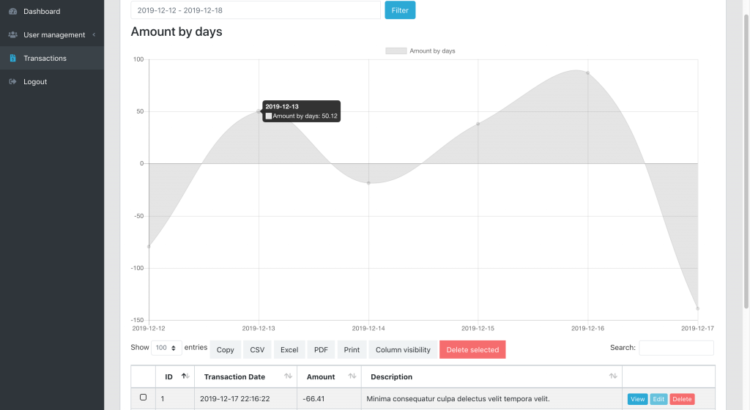
One of our customers asked how to add a from to date filter above a default data table. So we created a demo project and here I will explain how it works.
First, what it looks like – just the list of transactions, filtered by date from to, and with a table of amounts by day:
Second, create a link to the repository: Laravel Data Table Date Table
Now let’s move on to the code. How did we add a date range filter and chart to the top of the table?
Blade file components: DateRangePicker
First, in the file resources/views/admin/transactions/index.blade.php we add this HTML before the code for a typical datatable:
<div class="row">
    <div class="col-md-6">
    <form action="" id="filtersForm">
        <div class="input-group">
        <input type="text" name="from-to" class="form-control mr-2" id="date_filter">
        <span class="input-group-btn">
            <input type="submit" class="btn btn-primary" value="Filter">
        </span>
        </div>
    </form>
    </div>
</div>
<div class="row my-2" id="chart">
    <div class="{{ $chart->options['column_class'] }}">
        <h3>{!! $chart->options['chart_title'] !!}</h3>
        {!! $chart->renderHtml() !!}
    </div>
</div>
<table class=" table table-bordered table-striped table-hover ajaxTable datatable datatable-Transaction">
The last row is the start of the table itself. Now this table should be filtered by date range, right?
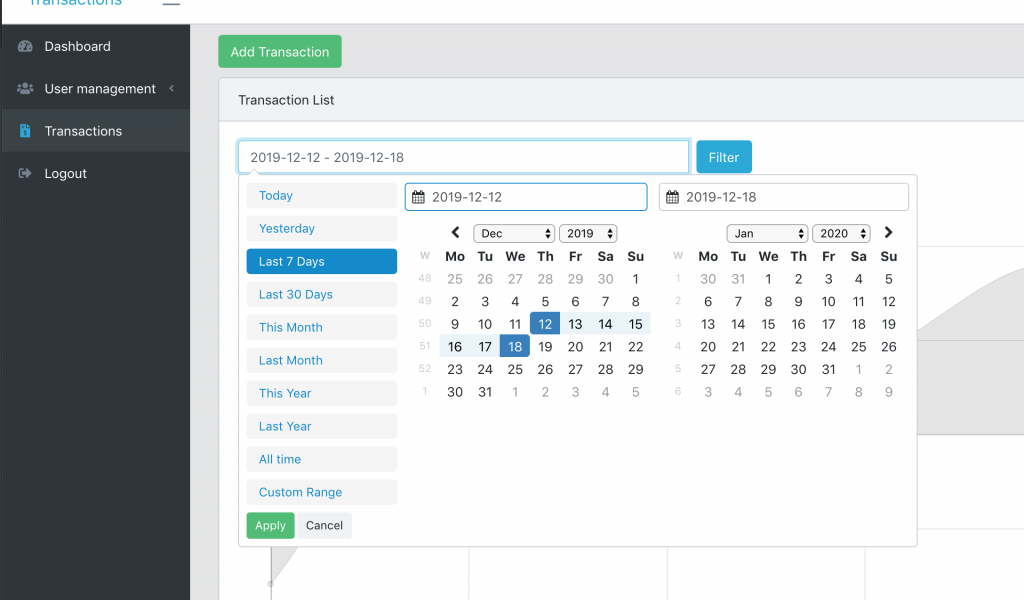
So here is the JavaScript that should be somewhere in the same Blade file below:
  let searchParams = new URLSearchParams(window.location.search)
  let dateInterval = searchParams.get('from-to');
  let start = moment().subtract(29, 'days');
  let end = moment();

  if (dateInterval) {
      dateInterval = dateInterval.split(' - ');
      start = dateInterval[0];
      end = dateInterval[1];
  }

  $('#date_filter').daterangepicker({
      "showDropdowns": true,
      "showWeekNumbers": true,
      "alwaysShowCalendars": true,
      startDate: start,
      endDate: end,
      locale: {
          format: 'YYYY-MM-DD',
          firstDay: 1,
      },
      ranges: {
          'Today': [moment(), moment()],
          'Yesterday': [moment().subtract(1, 'days'), moment().subtract(1, 'days')],
          'Last 7 Days': [moment().subtract(6, 'days'), moment()],
          'Last 30 Days': [moment().subtract(29, 'days'), moment()],
          'This Month': [moment().startOf('month'), moment().endOf('month')],
          'Last Month': [moment().subtract(1, 'month').startOf('month'), moment().subtract(1, 'month').endOf('month')],
          'This Year': [moment().startOf('year'), moment().endOf('year')],
          'Last Year': [moment().subtract(1, 'year').startOf('year'), moment().subtract(1, 'year').endOf('year')],
          'All time': [moment().subtract(30, 'year').startOf('month'), moment().endOf('month')],
      }
  });
Last thing with dates: we need to filter the table data based on these dates.
So we go to app/Http/Controllers/Admin/TransactionsController.php and method hint().
To get the data, we use the Laravel Datatables package, which forms an Eloquent query and then passes it to Datatables.
We will add Eloquent Query Scope to it.
Before:
$query = Transaction::query()
    ->select(sprintf('%s.*', (new Transaction)->table));
$table = Datatables::of($query);
After:
$query = Transaction::query()
    ->filterDates()
    ->select(sprintf('%s.*', (new Transaction)->table));
$table = Datatables::of($query);
See filterDates()? This will be a filter scope inside application/Transaction.php model:
public function scopeFilterDates($query)
{
    $date = explode(" - ", request()->input('from-to', ""));

    if(count($date) != 2)
    {
        $date = [now()->subDays(29)->format("Y-m-d"), now()->format("Y-m-d")];
    }

    return $query->whereBetween('transaction_date', $date);
}
And there you have it, we will have the active filter on the table.
Draw a chart with Laravel charts package
The second part of this tutorial is the chart. I’ll repeat the Blade code to them, above:
<div class="row my-2" id="chart">
    <div class="{{ $chart->options['column_class'] }}">
        <h3>{!! $chart->options['chart_title'] !!}</h3>
        {!! $chart->renderHtml() !!}
    </div>
</div>
Seems pretty weird, right? What is a $graph and methods like renderHtml()? They come from our own Laravel Charts package, for drawing simple charts like this.
We use this package in the QuickAdminPanel module for the dashboard and reports, and in this case to create a chart – this is the code we need to add app/Http/Controllers/Admin/TransactionsController.php – hint() method:
use LaravelDaily\LaravelCharts\Classes\LaravelChart;

// ...

$date = explode(" - ", request()->input('from-to', ""));

if(count($date) != 2)
{
    $date = [now()->subDays(29)->format("Y-m-d"), now()->format("Y-m-d")];
}

$settings = [
    'chart_title'           => 'Amount by days',
    'chart_type'            => 'line',
    'report_type'           => 'group_by_date',
    'model'                 => 'App\\Transaction',
    'group_by_field'        => 'transaction_date',
    'group_by_period'       => 'day',
    'aggregate_function'    => 'sum',
    'aggregate_field'       => 'amount',
    'filter_field'          => 'transaction_date',
    'range_date_start'      => $date[0],
    'range_date_end'        => $date[1],
    'group_by_field_format' => 'Y-m-d H:i:s',
    'column_class'          => 'col-md-12',
    'entries_number'        => '5',
    'continuous_time'       => true,
];

$chart = new LaravelChart($settings);

return view('admin.transactions.index', compact('chart'));
And there you have it, the graph is also made. Hope this helps!
Link again to main repository: LaravelDaily/Laravel-Datatables-Dates-Chart